“From Chaos to Clarity: Managing Work Smarter with Trello”
Trello for Freelancers: Boost Your Productivity and Manage Clients Like a Pro
Freelancing offers freedom—but it also demands discipline, organization, and the ability to juggle multiple projects at once. Between client communication, task deadlines, invoices, and personal projects, the chaos can pile up quickly. That’s why more freelancers are turning to Trello, the ultimate visual task management tool that keeps your workflow streamlined and stress-free.
Whether you’re a freelance designer, developer, writer, virtual assistant, or consultant, Trello gives you a clear roadmap of your work, helping you stay on track and deliver great results—every time.
🎯 What Is Trello and Why Should Freelancers Use It?
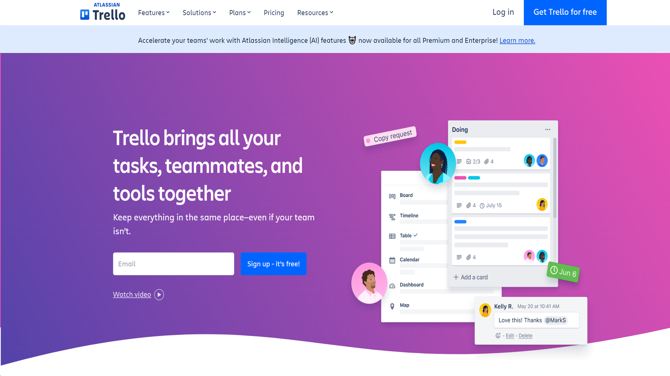
Trello is a web-based project management tool that uses boards, lists, and cards to help users visually organize tasks and projects. It’s simple, intuitive, and highly customizable—perfect for freelancers who need structure without complexity.
Think of Trello as your digital whiteboard, where each project has its own board, every phase of work is a list, and every task is a card you can track, update, and complete.
🔑 Key Benefits of Trello for Freelancers
✅ Stay Organized
Trello’s visual layout makes it easy to see everything on your plate at a glance. From client projects to admin tasks, you’ll never lose track of what’s next.
✅ Manage Multiple Clients Seamlessly
Create separate boards for each client or project. Keep files, communication, feedback, and deadlines all in one place.
✅ Plan Your Week Effectively
Use Trello to structure your week ahead with drag-and-drop simplicity. Trello’s calendar and timeline views let you plan realistically and avoid burnout.
✅ Track Your Invoicing and Payments
Use cards to log completed tasks, track invoice statuses, and set payment reminders. You can even attach PDFs of invoices to relevant cards.
✅ Collaborate with Clients Easily
Invite clients to specific Trello boards to share progress, collect feedback, or organize deliverables—without overwhelming them with tools.
🛠️ Trello Features That Freelancers Love
📋 Boards, Lists & Cards
Each client or major project can have its own board. Organize work into lists like “To Do,” “In Progress,” “Waiting on Client,” and “Done.” Cards can represent specific tasks, revisions, or deliverables.
⏱️ Due Dates & Reminders
Set deadlines on your cards to track due dates and sync them with your calendar. Get automatic notifications before something is due.
🔗 File Attachments
Attach documents, images, invoices, or links directly to task cards so everything stays in one place.
🧠 Butler Automation
Automate recurring tasks like weekly updates or reminders to send invoices. Butler makes it easy to save time and reduce admin work.
🧩 Power-Ups
Supercharge your boards with Power-Ups:
-
Calendar View – See all your tasks over time
-
Google Drive – Attach files and collaborate
-
Slack Integration – Get task updates in real-time
-
Time Tracking (e.g. Clockify or Everhour) – Log time on tasks directly from Trello
💡 Trello Workflow Example for Freelancers
Let’s say you’re a freelance content writer. Your Trello board might include:
-
Lists: Inquiry / Brief Received → Research → Writing → Editing → Sent to Client → Invoice Sent → Paid
-
Cards: Each card represents a specific article, with due dates, notes, attached briefs, and checklists for editing stages.
You can duplicate this structure for every client or project type—and tweak it to fit your workflow.
📱 Work from Anywhere with Trello Mobile
Trello’s mobile app lets you manage tasks on the go—perfect for freelancers who work from coffee shops, co-working spaces, or travel frequently. Update boards, add new tasks, or check off completed work right from your phone.
💵 Is Trello Free for Freelancers?
Yes! Trello offers a generous Free Plan that includes:
-
Unlimited cards and members
-
Up to 10 boards per workspace
-
Basic automation
-
One Power-Up per board
As your freelancing business grows, you can upgrade to Trello Standard or Premium for advanced features like unlimited boards, timeline view, dashboard analytics, and more.
📊 Level Up: Use Trello as a Client Portal
Impress your clients by using Trello as a mini project portal:
-
Share timelines and progress transparently
-
Collect feedback via comments
-
Upload deliverables directly
-
Pin important notes, revisions, or brand guides
Trello makes you look professional, organized, and easy to work with—qualities clients love.
🧠 Trello Tips for Freelancers
-
Use color-coded labels for project types or urgency.
-
Create a “Today” list to focus your daily tasks.
-
Use checklists within cards for sub-tasks and progress tracking.
-
Archive completed cards weekly to keep your boards clean.
-
Duplicate your favorite board structure for every new client to save setup time.
🚀 Start Using Trello to Manage Your Freelance Career
Trello isn’t just a task list—it’s your command center. It keeps your projects on schedule, clients informed, and your sanity intact.
Whether you’re juggling multiple deadlines, organizing creative assets, or sending invoices, Trello empowers you to run your freelance business like a pro.
👉 Sign up at Trello.com and start organizing your freelance world today—for free.








Post Comment